
Step by step on how to install the Victory 4x4 Roof Rack Accessory Mount.
Installation Video: https://www.youtube.com/watch?v=g5mFOjFTdSM&t=7s
Questions or Support:
Phone: 269-353-1184
Email: info@victory4x4.com


Step by step on how to install the Victory 4x4 Roof Rack Accessory Mount.
Installation Video: https://www.youtube.com/watch?v=g5mFOjFTdSM&t=7s
Questions or Support:
Phone: 269-353-1184
Email: info@victory4x4.com

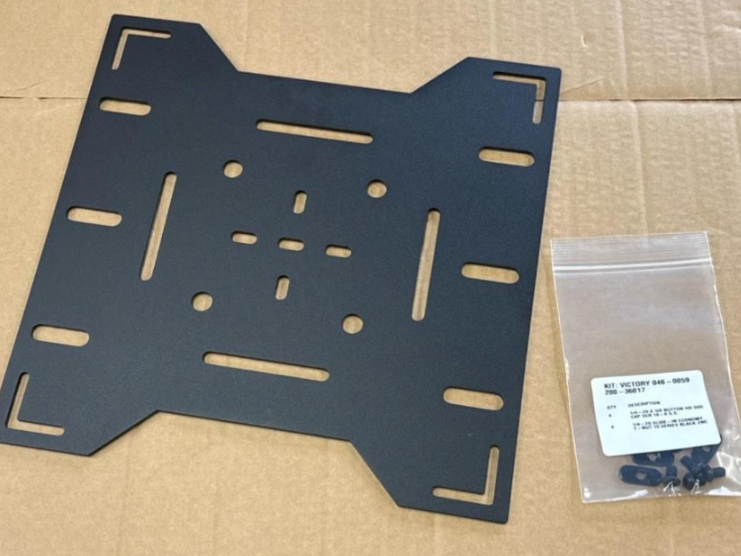
The Accessory Mount has several mounting patterns built in. The four outer bolt holes fit the Victory 4x4 Universal Tire Mount, the center pattern fits RotopaX mounts, and the outer holes are for traction boards (you will need two Accessory Mounts to carry traction boards). The extra slots can be used for Quick Fist clamps to carry an axe, shovel, and more. Tip: It is easier to bolt your tire mount or RotopaX mount to the panel before installing the panel on the rack.

The hardware kit includes (4) 1/4-20 T-nuts and (4) 1/4-20 x 3/8 inch button head screws. Drop each T-nut into the top channel of the rack rail at one of the drop-in points machined into the rail, with the flange head facing up. Slide the T-nuts down the channel to roughly where the panel will sit, two on each rail.

Set the Accessory Mount on the rails so the L-shaped slots in the corners line up over the T-nuts. The panel can be mounted in either direction or offset on the rails depending on what you are carrying, and the rails can also slide in and out for more adjustment. If you are mounting traction boards, make sure the rails are not blocking the mounting holes so the traction board mount studs or carriage bolts can pass through the panel.

Start a screw through each corner slot into the T-nut by hand. Once the panel is where you want it, square it up and tighten all (4) screws with a 5/32 inch Allen wrench.

Bolt your gear to the Accessory Mount, such as a tire mount, RotopaX, traction boards or Quick Fist clamps. Make sure everything is secured tightly before driving.
That’s it! Make sure all of your bolts are tight and enjoy your new Roof Rack Accessory Mount!
15 Min - SOPs, Guide

6 Min - Guide
2 Min - Guides and Video
10 Min - Guides and Video
Suggest an improvement, or report a bug, direct from the app/platform.
Connect GembaDocs with external systems